WebMCP Explained: How to Make Your Website Ready for AI Agents (2026)
Learn what WebMCP is, how Google's Lighthouse Agentic Browsing audit scores your site, and how to implement WebMCP form annotations and tool registration to help AI agents interact with your website.
By Mubashir Hussain · CrawlReady AI · Human-reviewed technical guide
Some guides may be AI-assisted and are always human-reviewed for accuracy before publish. See our Google generative AI search guide and Google's AI content guidance.
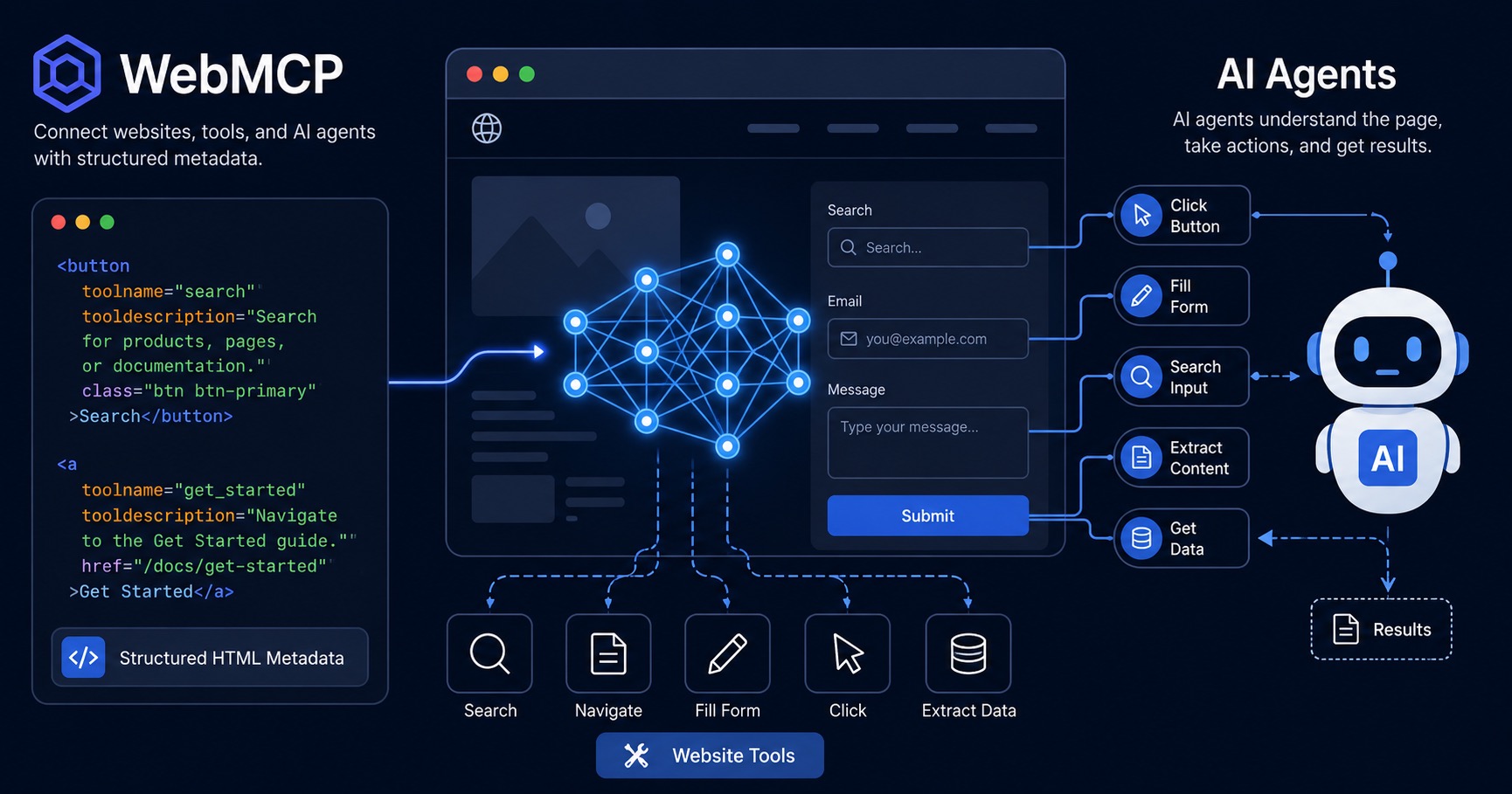
A new Lighthouse audit category called Agentic Browsing appeared in May 2026. It scores how well your website works for AI agents — not just search crawlers, but autonomous browser agents that can navigate, fill forms, and take actions on your behalf. At the centre of this is WebMCP, a proposed web standard that gives AI agents a clear API for your site. This guide explains what it is and how to implement it.
What is WebMCP?
WebMCP (Web Model Context Protocol) is an open web standard jointly developed by Google and Microsoft that lets websites expose structured, callable tools to AI agents running inside the browser. Think of it as writing an API that lives in your HTML — instead of an agent scraping the DOM and guessing what to click, you declare exactly what it can do and how.
WebMCP was accepted by the W3C Web Machine Learning Community Group in late 2025. Chrome 146 shipped an early preview in February 2026, and the public origin trial launched in Chrome 149 in May 2026.
The Lighthouse Agentic Browsing audit
Google's Lighthouse 13.4 introduced a new Agentic Browsing category alongside the existing Performance, Accessibility, Best Practices, and SEO categories. It currently checks three areas:
- Agent Accessibility — Is your accessibility tree well-formed? Broken ARIA attributes and focusable elements inside
aria-hiddencontainers block AI agents just as they block screen readers. - llms.txt — Does your
/llms.txtfile follow the spec? It must be valid Markdown with at least one H1 heading and properly formatted[label](url)links. - WebMCP — Are your forms annotated? Are tools registered? Are schemas valid? These three sub-checks are currently unscored but will be tracked as agent-readiness signals.
A perfect Agentic Browsing score requires all three areas to pass. Fixing them also tends to improve your core Accessibility score.
How to implement WebMCP: the declarative API
The easiest way to expose tools is the declarative API — HTML attributes you add directly to your <form> elements. No JavaScript required. The browser reads these attributes and makes the form available to AI agents as a callable function.
Form-level attributes
| Attribute | Purpose |
|---|---|
toolname | Unique identifier for the tool (camelCase or snake_case, no spaces) |
tooldescription | Plain-English description of what the form does — this is what agents read to decide whether to use it |
toolautosubmit | Boolean — when present, the browser submits the form automatically after an agent fills it in |
Field-level attribute
| Attribute | Purpose |
|---|---|
toolparamdescription | Describes what this specific field expects — included in the JSON Schema the browser generates for the tool |
Example: URL audit form
<form toolname="auditWebsite"
      tooldescription="Runs a free AI and SEO crawl readiness audit on a website URL."
      toolautosubmit>
  <input type="url"
         name="url"
         required
         toolparamdescription="Full URL of the website to audit (e.g. https://example.com)">
  <button type="submit">Run Free Audit</button>
</form>
Removing either toolname or tooldescription unregisters the tool entirely — both are required.
Example: contact form
<form toolname="sendContactMessage"
      tooldescription="Sends an inquiry to the support team.">
  <input type="text" name="name" required
         toolparamdescription="Full name of the sender">
  <input type="email" name="email" required
         toolparamdescription="Reply-to email address">
  <textarea name="message" required
            toolparamdescription="The message or question"></textarea>
  <button type="submit">Send</button>
</form>
Note the missing toolautosubmit on the contact form — you generally want users to review messages before they are sent on their behalf.
How to implement WebMCP: the imperative API
For actions that are not tied to a form — navigation, fetching data, toggling UI state — use the imperative API. This requires Chrome 149+ and may need an origin trial token in production.
if ('modelContext' in document) {
  document.modelContext.registerTool({
    name: 'navigate_to_audit',
    description: 'Go to the free audit page to check a website for AI crawl readiness.',
    inputSchema: {
      type: 'object',
      properties: {}
    },
    execute: async () => {
      window.location.href = '/audit';
      return 'Navigating to the audit page.';
    },
    annotations: { readOnlyHint: true }
  });
}
Key points about the imperative API:
- Always guard with
if ('modelContext' in document)— the API does not exist in older browsers readOnlyHint: truetells agents the tool does not modify data- Tools must be registered before Lighthouse takes its snapshot — register them early in a non-deferred script if you want Lighthouse to detect them
- Use
const controller = new AbortController()and pass{ signal: controller.signal }as the second argument if you need to unregister a tool later
Common implementation mistakes
- Missing
nameon inputs — the browser's JSON Schema generator reads thenameattribute to name each parameter. Inputs withoutnamemay be omitted from the schema. - Registering tools in deferred scripts — Lighthouse snapshots tools at page load. A
<script defer>or late-registeringDOMContentLoadedlistener may miss the window. Use a non-deferred inline script for imperative registrations. - Omitting
toolautosubmiton search/lookup forms — without it, agents fill the form but wait for a submit action. Add it to any form where immediate submission is safe. - Vague descriptions —
tooldescription="Search form"is not useful. Describe what the tool returns:"Runs a crawl readiness audit and returns AI crawler access, robots.txt, llms.txt, and indexability results."
WebMCP and your llms.txt
WebMCP and llms.txt serve complementary purposes. llms.txt is a static file that tells AI systems what your site contains and links to important pages. WebMCP exposes dynamic, callable tools that agents can invoke at runtime. Both are checked by the Lighthouse Agentic Browsing audit and both contribute to agent readiness.
If you have not published an llms.txt yet, the Lighthouse audit will flag it. The file must be valid Markdown, contain at least one H1 heading (# Site Name), and link to your key pages using [label](url) syntax — plain Label: URL strings are not recognised as links.
What to check first
- Run the CrawlReady AI free audit on your homepage — it will flag accessibility tree issues, llms.txt problems, and (where supported) WebMCP coverage
- Add
toolnameandtooldescriptionto every<form>on your site - Add
toolparamdescriptionto all<input>,<select>, and<textarea>elements inside those forms - Register navigation tools with the imperative API in a non-deferred script
- Publish or fix your
/llms.txtusing proper Markdown link format - Fix any ARIA violations flagged by the accessibility tree audit — these block agents the same way they block screen readers
The Agentic Browsing category is still marked experimental and will evolve as the WebMCP spec matures. Start with the declarative form annotations — they require no JavaScript and degrade gracefully in all browsers — then layer in imperative tools as browser support grows.
Frequently Asked Questions
What is WebMCP?
WebMCP (Web Model Context Protocol) is a proposed open web standard that lets websites expose structured tools directly to in-browser AI agents. Instead of agents guessing how to interact with your page, WebMCP lets you declare exactly what actions are available — like running an audit, submitting a form, or navigating to a key page — using HTML attributes and a JavaScript API.
What is the Lighthouse Agentic Browsing category?
Google added an 'Agentic Browsing' category to Lighthouse 13.4 (May 2026). It scores how well your website is built for AI agents to read, navigate, and interact with. It checks your accessibility tree, llms.txt file, and WebMCP implementation. The category is still experimental and subject to change.
Do I need an origin trial to use WebMCP?
The WebMCP imperative JavaScript API (document.modelContext.registerTool) requires Chrome 149+ and may need an origin trial token in production. The declarative HTML form annotation API (toolname, tooldescription attributes on forms) works without a token in supporting browsers and degrades gracefully in others.
Does WebMCP affect my Google Search ranking?
No, WebMCP does not directly influence Google Search rankings. It is specifically aimed at helping AI browser agents (like those built on Chrome) interact with your website. However, the accessibility improvements that come with WebMCP implementation can improve your Lighthouse Accessibility score.
What browsers support WebMCP?
WebMCP was introduced in Chrome 146 (early preview, February 2026) with the public origin trial launching in Chrome 149 (May 2026). Microsoft Edge is also expected to support the standard. Other browsers do not yet support it. Always guard imperative API calls with if ('modelContext' in document).
Important disclaimer
This guide is for educational purposes only. No tool or technique guarantees search rankings, AI inclusion, or specific traffic results. Refer to official documentation from search engines and AI providers for current policies.